<?xml version="1.0" encoding="utf-8"?><feed xmlns="http://www.w3.org/2005/Atom" ><generator uri="https://jekyllrb.com/" version="3.10.0">Jekyll</generator><link href="https://gustavodemorais.github.io/blog/feed.xml" rel="self" type="application/atom+xml" /><link href="https://gustavodemorais.github.io/blog/" rel="alternate" type="text/html" /><updated>2026-09-07T16:08:58+00:00</updated><id>https://gustavodemorais.github.io/blog/feed.xml</id><title type="html">Gustavo de Morais</title><subtitle>Notes on Apache Flink, streaming SQL, and other engineering things.</subtitle><author><name>Gustavo de Morais</name></author><entry><title type="html">Flink SQL Evolution: Handling Custom CDC with FROM_CHANGELOG and TO_CHANGELOG</title><link href="https://gustavodemorais.github.io/blog/2026/08/25/flink-sql-changelog-ptfs.html" rel="alternate" type="text/html" title="Flink SQL Evolution: Handling Custom CDC with FROM_CHANGELOG and TO_CHANGELOG" /><published>2026-08-25T00:00:00+00:00</published><updated>2026-08-25T00:00:00+00:00</updated><id>https://gustavodemorais.github.io/blog/2026/08/25/flink-sql-changelog-ptfs</id><content type="html" xml:base="https://gustavodemorais.github.io/blog/2026/08/25/flink-sql-changelog-ptfs.html"><![CDATA[<p>Hey all 👋 I’m Gustavo de Morais, an Apache Flink committer. I recently authored and released <a href="https://cwiki.apache.org/confluence/display/FLINK/FLIP-564%3A+Support+FROM_CHANGELOG+and+TO_CHANGELOG+built-in+PTFs">FLIP-564: Support FROM_CHANGELOG and TO_CHANGELOG built-in PTFs</a>. This is brand new functionality for things that just weren’t possible in Flink SQL before.</p>

<p>That said, I thought it was worth a blog post - my first one after intensively contributing to the open source Apache Flink project for almost 2 years, inspired by <a href="https://rmoff.net/">Robin Moffat</a> :)</p>

<p><strong>In this post:</strong></p>

<ul>
  <li><a href="#changelogs-and-cdc">What are changelogs, and what is CDC?</a></li>
  <li><a href="#to-and-from-changelog">What are TO_CHANGELOG and FROM_CHANGELOG?</a></li>
  <li><a href="#common-use-cases">What can these functions be used for?</a></li>
  <li><a href="#whats-still-missing">What’s missing?</a></li>
</ul>

<h2 id="why-are-these-new-changelog-functions-important">Why are these new changelog functions important?</h2>

<p>Flink gets used for a lot of different things, and it works well for most of them, but there are still some gaps here and there. Let’s take data replication, one of the most common use cases: it works great today for a set of supported formats. But if your database or service outputs events in another format, the only escape hatch today is writing custom code in the Flink SQL world. There are also cases where Flink already picks an internal changelog format while doing some operations (append, upsert, retract) for you, and you just want a bit more control over that.</p>

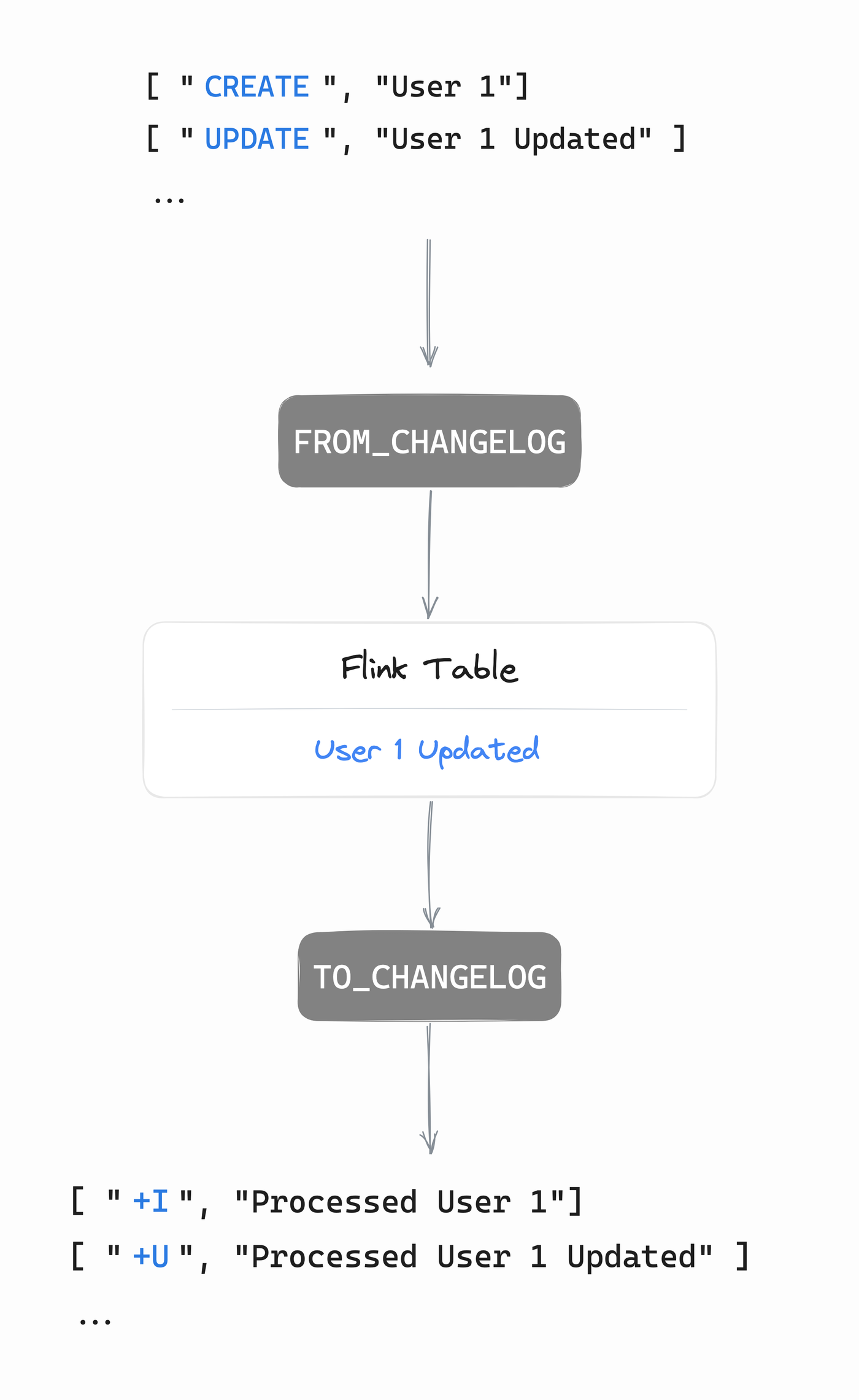
<p><code class="language-plaintext highlighter-rouge">TO_CHANGELOG</code> and <code class="language-plaintext highlighter-rouge">FROM_CHANGELOG</code> are new built-in tools that fill exactly those gaps. Here is a general diagram of how the functions could be used to connect two systems with different changelogs:</p>

<p><a href="#lightbox-roundtrip">
  <img src="/blog/assets/images/changelog-ptfs-roundtrip.png" alt="The round trip: a raw changelog goes through FROM_CHANGELOG into a Flink table, then through TO_CHANGELOG back into a changelog" />
</a>
<a href="#_" id="lightbox-roundtrip" class="lightbox-overlay">
  <img src="/blog/assets/images/changelog-ptfs-roundtrip.png" alt="The round trip: a raw changelog goes through FROM_CHANGELOG into a Flink table, then through TO_CHANGELOG back into a changelog" />
</a></p>

<p>Using the functions sounds simple, right? Making this reliable, scalable, and efficient across billions of records between two systems isn’t. That’s what Flink takes care of under the hood - let’s just focus on the functions and changelogs here.</p>

<h2 id="changelogs-and-cdc">What are changelogs, and what is CDC?</h2>

<p>If you have no idea about what changelogs are, <del>good for you</del> there are some small examples which I hope will help! They are pretty interesting and something you might want to hear about - they’re behind a lot of scalable systems and databases you know (MySQL, Postgres, Kafka Streams and the list is long).</p>

<p>CDC stands for Change Data Capture: instead of just storing the current state of a database, you capture every insert, update, and delete that happens to it as a stream of events, so other systems can react to changes as they happen instead of polling for them. A changelog is just what that series of events looks like.</p>

<p>When you create a table in Flink SQL, it ends up with one of three changelog modes:</p>

<ul>
  <li><strong>Append</strong>: only inserts (<code class="language-plaintext highlighter-rouge">+I</code>)</li>
  <li><strong>Retract</strong>: inserts, plus updates split into an old image and a new image (<code class="language-plaintext highlighter-rouge">-U</code>, <code class="language-plaintext highlighter-rouge">+U</code>), plus deletes (<code class="language-plaintext highlighter-rouge">-D</code>)</li>
  <li><strong>Upsert</strong>: inserts, updates, and deletes, all keyed - no need for the old image, the key tells you what’s being replaced</li>
</ul>

<p>Say an order gets created, then its status changes, then it gets deleted. In retract mode that’s:</p>

<div class="language-plaintext highlighter-rouge"><div class="highlight"><pre class="highlight"><code>+I[order: 1, status: NEW]
-U[order: 1, status: NEW]
+U[order: 1, status: SHIPPED]
+I[order: 2, status: NEW] -&gt; Second new unrelated order
-D[order: 1, status: SHIPPED] -&gt; First order deletion event
</code></pre></div></div>

<p>This generates a table, where you only see the second order:</p>

<div class="language-plaintext highlighter-rouge"><div class="highlight"><pre class="highlight"><code>order: 2, status: NEW
</code></pre></div></div>

<p>In upsert mode (order id as key), same changes are shorter:</p>

<div class="language-plaintext highlighter-rouge"><div class="highlight"><pre class="highlight"><code>+I[order: 1, status: NEW]
+U[order: 1, status: SHIPPED]
+I[order: 2, status: NEW]
-D[order: 1, status: SHIPPED] -&gt; First order deletion event
</code></pre></div></div>

<p>This generates the same table, where you only see the second order:</p>

<div class="language-plaintext highlighter-rouge"><div class="highlight"><pre class="highlight"><code>order: 2, status: NEW
</code></pre></div></div>

<p>Both streams look different, but they decode to the exact same table. That’s really all a changelog is: an encoding of how a table got to where it is. The table is the actual information; the changelog is just one of several ways to say it out loud. And in append mode, things are easier and every event is a new row, there are no updates. You just append things on top of each other and this is your table. Append can “express less”. However, append is also the cheapest mode of all since it’s a raw log of messages. In general, append pipelines are the most scalable and efficient ones. But yeah, each mode has its use cases.</p>

<p>That’s the core of the problem: three modes, and every CDC tool, format, and connector out there has its own opinion about which one it speaks and how. MySQL’s binlog, Debezium, DynamoDB Streams, a custom event you built yourself - they all encode inserts/updates/deletes differently, and until now Flink only understood the ones it had a connector for.</p>

<h2 id="to-and-from-changelog">What are TO_CHANGELOG and FROM_CHANGELOG?</h2>

<p>Two new dangerous (see below!) but powerful built-in functions, and for the first time in Flink SQL:</p>

<ul>
  <li><code class="language-plaintext highlighter-rouge">TO_CHANGELOG</code> lets you turn an updating pipeline back into an append-only one.</li>
  <li><code class="language-plaintext highlighter-rouge">FROM_CHANGELOG</code> lets you bring in a CDC format Flink has never heard of.</li>
</ul>

<p>Full parameter docs are <a href="https://nightlies.apache.org/flink/flink-docs-master/docs/sql/reference/queries/changelog/">here</a> if you want to jump ahead - below is each one with its full signature and a small example.</p>

<h3 id="to_changelog">TO_CHANGELOG</h3>

<p>Full signature:</p>

<div class="language-sql highlighter-rouge"><div class="highlight"><pre class="highlight"><code><span class="k">SELECT</span> <span class="o">*</span> <span class="k">FROM</span> <span class="n">TO_CHANGELOG</span><span class="p">(</span>
    <span class="k">input</span>                 <span class="o">=&gt;</span> <span class="k">TABLE</span> <span class="n">source_table</span> <span class="p">[</span><span class="k">PARTITION</span> <span class="k">BY</span> <span class="n">key_col</span><span class="p">],</span>
    <span class="n">op</span>                    <span class="o">=&gt;</span> <span class="k">DESCRIPTOR</span><span class="p">(</span><span class="n">op_column_name</span><span class="p">),</span>
    <span class="n">op_mapping</span>            <span class="o">=&gt;</span> <span class="k">MAP</span><span class="p">[</span><span class="s1">'INSERT, UPDATE_AFTER'</span><span class="p">,</span> <span class="s1">'u'</span><span class="p">,</span> <span class="s1">'DELETE'</span><span class="p">,</span> <span class="s1">'d'</span><span class="p">],</span>
    <span class="n">produces_full_deletes</span> <span class="o">=&gt;</span> <span class="nb">BOOLEAN</span>
<span class="p">)</span>
</code></pre></div></div>

<h4 id="a-quick-example">A quick example</h4>

<div class="language-sql highlighter-rouge"><div class="highlight"><pre class="highlight"><code><span class="k">SELECT</span> <span class="o">*</span> <span class="k">FROM</span> <span class="n">TO_CHANGELOG</span><span class="p">(</span>
    <span class="k">input</span> <span class="o">=&gt;</span> <span class="k">TABLE</span> <span class="n">orders_per_region</span>
<span class="p">)</span>
</code></pre></div></div>

<p>Say <code class="language-plaintext highlighter-rouge">orders_per_region</code> currently looks like this:</p>

<div class="language-plaintext highlighter-rouge"><div class="highlight"><pre class="highlight"><code>region: 'EU', cnt: 2
</code></pre></div></div>

<p>That single row in the table is the end result of two changes: an insert (<code class="language-plaintext highlighter-rouge">cnt: 1</code>), then an update (<code class="language-plaintext highlighter-rouge">cnt: 2</code>). <code class="language-plaintext highlighter-rouge">TO_CHANGELOG</code> hands you the changelog that led to that final table:</p>

<div class="language-plaintext highlighter-rouge"><div class="highlight"><pre class="highlight"><code>+I[op: 'INSERT',       region: 'EU', cnt: 1]
+I[op: 'UPDATE_AFTER',  region: 'EU', cnt: 2]
</code></pre></div></div>

<h3 id="from_changelog">FROM_CHANGELOG</h3>

<p>Full signature:</p>

<div class="language-sql highlighter-rouge"><div class="highlight"><pre class="highlight"><code><span class="k">SELECT</span> <span class="o">*</span> <span class="k">FROM</span> <span class="n">FROM_CHANGELOG</span><span class="p">(</span>
    <span class="k">input</span>          <span class="o">=&gt;</span> <span class="k">TABLE</span> <span class="n">source_table</span> <span class="p">[</span><span class="k">PARTITION</span> <span class="k">BY</span> <span class="n">key_col</span> <span class="p">[</span><span class="k">ORDER</span> <span class="k">BY</span> <span class="n">time_col</span><span class="p">]],</span>
    <span class="n">op</span>             <span class="o">=&gt;</span> <span class="k">DESCRIPTOR</span><span class="p">(</span><span class="n">op_column_name</span><span class="p">),</span>
    <span class="n">op_mapping</span>     <span class="o">=&gt;</span> <span class="k">MAP</span><span class="p">[</span><span class="s1">'c, r'</span><span class="p">,</span> <span class="s1">'INSERT'</span><span class="p">,</span> <span class="s1">'u'</span><span class="p">,</span> <span class="s1">'UPDATE_AFTER'</span><span class="p">,</span> <span class="s1">'d'</span><span class="p">,</span> <span class="s1">'DELETE'</span><span class="p">],</span>
    <span class="n">error_handling</span> <span class="o">=&gt;</span> <span class="s1">'FAIL'</span> <span class="o">|</span> <span class="s1">'SKIP'</span>
<span class="p">)</span>
</code></pre></div></div>

<h4 id="a-quick-example-1">A quick example</h4>

<div class="language-sql highlighter-rouge"><div class="highlight"><pre class="highlight"><code><span class="k">SELECT</span> <span class="o">*</span> <span class="k">FROM</span> <span class="n">FROM_CHANGELOG</span><span class="p">(</span>
    <span class="k">input</span> <span class="o">=&gt;</span> <span class="k">TABLE</span> <span class="n">raw_cdc</span>
<span class="p">)</span>
</code></pre></div></div>

<p>Now go the other way. Say you have a <code class="language-plaintext highlighter-rouge">raw_cdc</code> Kafka topic coming from whichever system or database. For simplicity, we’ll use the same example as above.</p>

<div class="language-plaintext highlighter-rouge"><div class="highlight"><pre class="highlight"><code>+I[op: 'INSERT',       region: 'EU', cnt: 1]
+I[op: 'UPDATE_AFTER',  region: 'EU', cnt: 2]
</code></pre></div></div>

<p><code class="language-plaintext highlighter-rouge">FROM_CHANGELOG</code> reads that <code class="language-plaintext highlighter-rouge">op</code> column and turns each row into the row kind it names, landing you right back at the same Flink table:</p>

<div class="language-plaintext highlighter-rouge"><div class="highlight"><pre class="highlight"><code>region: 'EU', cnt: 2
</code></pre></div></div>

<p>That’s the whole trick: nothing about the data changed, just which side is allowed to see it as a table and which side has to see it as a plain, appendable log. These new functions are just a nice, custom way of connecting the input and output of two data format worlds to unlock new use cases!</p>

<p><em>Now you may ask me, why are they dangerous, Gustavo?</em></p>

<p>Because you’re telling Flink how to interpret raw bytes as inserts, updates, and deletes yourself - get the mapping wrong, and Flink will happily build you a broken table without complaining. Take this extreme (but valid) mapping:</p>

<div class="language-sql highlighter-rouge"><div class="highlight"><pre class="highlight"><code><span class="n">op_mapping</span> <span class="o">=&gt;</span> <span class="k">MAP</span><span class="p">[</span><span class="s1">'INSERT'</span><span class="p">,</span> <span class="s1">'DELETE'</span><span class="p">,</span> <span class="s1">'DELETE'</span><span class="p">,</span> <span class="s1">'INSERT'</span><span class="p">]</span>
</code></pre></div></div>

<p>Every real insert now deletes a row that was never there, and every real delete resurrects one that should be gone. Nothing crashes - your table is just silently wrong. 🧨</p>

<h2 id="what-problems-do-they-solve">What problems do they solve?</h2>

<p>I think they solve problems in two distinct major areas. This is how I view things:</p>

<ol>
  <li><strong>Reading and writing CDC in a format Flink doesn’t have a connector for.</strong> No custom deserializer to write, no waiting on a connector - just describe your operation column in SQL.</li>
  <li><strong>Working around planner limitations.</strong> Just as an example, some operators, like <code class="language-plaintext highlighter-rouge">LAG</code> over an <code class="language-plaintext highlighter-rouge">OVER</code> window, only accept certain changelog modes as input. <code class="language-plaintext highlighter-rouge">TO_CHANGELOG</code> lets you explicitly flatten an updating stream into something they can consume - which, not coincidentally, is exactly what produces <code style="color:red">Can't generate a valid execution plan for the given query:</code>.</li>
</ol>

<p>PS: A lot of times the error message means your query is broken and not the engine!</p>

<h2 id="common-use-cases">What can these functions be used for?</h2>

<blockquote>
  <p>Thanks to David Anderson, Martijn Visser, and Taku Suzuki, who shared some of the use cases below.</p>
</blockquote>

<p>As mentioned, these functions allow new functionality that wasn’t possible before. I’ve gathered some examples that we’ll go through.</p>

<h3 id="writing-an-aggregation-to-an-append-only-sink">Writing an aggregation to an append-only sink</h3>

<p>Any <code class="language-plaintext highlighter-rouge">GROUP BY</code> aggregation over a stream produces an updating table - Flink has to be able to update the result for a key when a new row for that key shows up. An append-only sink won’t take that.</p>

<div class="language-sql highlighter-rouge"><div class="highlight"><pre class="highlight"><code><span class="k">CREATE</span> <span class="k">VIEW</span> <span class="n">totals</span> <span class="k">AS</span>
<span class="k">SELECT</span> <span class="n">customer_id</span><span class="p">,</span> <span class="k">COUNT</span><span class="p">(</span><span class="o">*</span><span class="p">)</span> <span class="k">AS</span> <span class="n">cnt</span>
<span class="k">FROM</span> <span class="n">orders</span>
<span class="k">GROUP</span> <span class="k">BY</span> <span class="n">customer_id</span><span class="p">;</span>

<span class="k">INSERT</span> <span class="k">INTO</span> <span class="n">sink</span>
<span class="k">SELECT</span> <span class="o">*</span> <span class="k">FROM</span> <span class="n">TO_CHANGELOG</span><span class="p">(</span><span class="k">input</span> <span class="o">=&gt;</span> <span class="k">TABLE</span> <span class="n">totals</span><span class="p">);</span>
</code></pre></div></div>

<p><code class="language-plaintext highlighter-rouge">TO_CHANGELOG</code> flattens the retract output into inserts with an explicit <code class="language-plaintext highlighter-rouge">op</code> column, so the append-only sink can take it.</p>

<h3 id="deduplicating-records-without-watermarks">Deduplicating records without watermarks</h3>

<p>Flink only trusts a dedup’s <code class="language-plaintext highlighter-rouge">ROW_NUMBER()</code> winner as final once it’s ordered by a watermarked time attribute. Order by anything else, and the planner keeps the result updating - even when the winner can never actually change, like with exact duplicates:</p>

<div class="language-sql highlighter-rouge"><div class="highlight"><pre class="highlight"><code><span class="k">SELECT</span> <span class="o">*</span> <span class="k">FROM</span> <span class="n">TO_CHANGELOG</span><span class="p">((</span>
    <span class="k">SELECT</span> <span class="n">trade_id</span><span class="p">,</span> <span class="n">ticker</span><span class="p">,</span> <span class="n">quantity</span><span class="p">,</span> <span class="n">price</span>
    <span class="k">FROM</span> <span class="p">(</span>
        <span class="k">SELECT</span> <span class="o">*</span><span class="p">,</span> <span class="n">ROW_NUMBER</span><span class="p">()</span>
            <span class="n">OVER</span> <span class="p">(</span><span class="k">PARTITION</span> <span class="k">BY</span> <span class="n">trade_id</span><span class="p">,</span> <span class="n">ticker</span><span class="p">,</span> <span class="n">quantity</span><span class="p">,</span> <span class="n">price</span>
                  <span class="k">ORDER</span> <span class="k">BY</span> <span class="n">trade_id</span><span class="p">,</span> <span class="n">ticker</span><span class="p">,</span> <span class="n">quantity</span><span class="p">,</span> <span class="n">price</span> <span class="k">ASC</span><span class="p">)</span> <span class="k">AS</span> <span class="n">row_num</span>
        <span class="k">FROM</span> <span class="n">trades_with_dups</span>
    <span class="p">)</span>
    <span class="k">WHERE</span> <span class="n">row_num</span> <span class="o">=</span> <span class="mi">1</span>
<span class="p">));</span>
</code></pre></div></div>

<p>Now dedup is append-only and deterministic, no event time or watermarks involved at all - just keep in mind this holds for true exact duplicates. This is common after Flink jobs reprocess and leave exact duplicates in the sink.</p>

<h3 id="using-an-append-only-built-in-function-on-an-updating-stream">Using an append-only built-in function on an updating stream</h3>

<p>Let’s take LAG as an example: it’s a function that gives you the previous row’s value, but only accepts append-only tables. An updating view doesn’t qualify, so Flink refuses to plan it. <code class="language-plaintext highlighter-rouge">TO_CHANGELOG</code> fixes that by turning the updates into explicit inserts first:</p>

<div class="language-sql highlighter-rouge"><div class="highlight"><pre class="highlight"><code><span class="k">CREATE</span> <span class="k">VIEW</span> <span class="n">orders_changelog</span> <span class="k">AS</span>
<span class="k">SELECT</span> <span class="n">op</span><span class="p">,</span> <span class="n">order_id</span><span class="p">,</span> <span class="n">status</span><span class="p">,</span> <span class="n">ts</span>
<span class="k">FROM</span> <span class="n">TO_CHANGELOG</span><span class="p">(</span><span class="k">input</span> <span class="o">=&gt;</span> <span class="k">TABLE</span> <span class="n">orders</span><span class="p">);</span>

<span class="k">INSERT</span> <span class="k">INTO</span> <span class="n">sink</span>
<span class="k">SELECT</span> <span class="n">order_id</span><span class="p">,</span> <span class="n">op</span><span class="p">,</span> <span class="n">status</span><span class="p">,</span>
       <span class="n">LAG</span><span class="p">(</span><span class="n">status</span><span class="p">)</span> <span class="n">OVER</span> <span class="p">(</span><span class="k">PARTITION</span> <span class="k">BY</span> <span class="n">order_id</span> <span class="k">ORDER</span> <span class="k">BY</span> <span class="n">ts</span><span class="p">)</span> <span class="k">AS</span> <span class="n">prev_status</span>
<span class="k">FROM</span> <span class="n">orders_changelog</span><span class="p">;</span>
</code></pre></div></div>

<p>Now you get the previous status of an order on every change, something that simply wasn’t expressible before.</p>

<h3 id="converting-a-custom-cdc-format">Converting a custom CDC format</h3>

<p>When this was first brought up, I didn’t think it was actually supported yet - turns out it is. DynamoDB Streams has no Table API/SQL connector, and its events don’t look anything like Flink’s row kinds - they carry an <code class="language-plaintext highlighter-rouge">eventName</code> of <code class="language-plaintext highlighter-rouge">INSERT</code>, <code class="language-plaintext highlighter-rouge">MODIFY</code>, or <code class="language-plaintext highlighter-rouge">REMOVE</code>. There is a DataStream connector, but it just hands you raw records; you’re still on your own to write custom deserialization code to get any kind of CDC semantics out of it. <code class="language-plaintext highlighter-rouge">FROM_CHANGELOG</code> gets you there in plain SQL instead:</p>

<div class="language-sql highlighter-rouge"><div class="highlight"><pre class="highlight"><code><span class="k">INSERT</span> <span class="k">INTO</span> <span class="n">items</span>
<span class="k">SELECT</span> <span class="n">id</span><span class="p">,</span> <span class="n">message</span>
<span class="k">FROM</span> <span class="n">FROM_CHANGELOG</span><span class="p">(</span>
    <span class="k">input</span>      <span class="o">=&gt;</span> <span class="k">TABLE</span> <span class="n">dynamodb_cdc</span> <span class="k">PARTITION</span> <span class="k">BY</span> <span class="n">id</span><span class="p">,</span>
    <span class="n">op</span>         <span class="o">=&gt;</span> <span class="k">DESCRIPTOR</span><span class="p">(</span><span class="n">eventName</span><span class="p">),</span>
    <span class="n">op_mapping</span> <span class="o">=&gt;</span> <span class="k">MAP</span><span class="p">[</span>
        <span class="s1">'INSERT'</span><span class="p">,</span> <span class="s1">'INSERT'</span><span class="p">,</span>
        <span class="s1">'MODIFY'</span><span class="p">,</span> <span class="s1">'UPDATE_AFTER'</span><span class="p">,</span>
        <span class="s1">'REMOVE'</span><span class="p">,</span> <span class="s1">'DELETE'</span>
    <span class="p">]</span>
<span class="p">);</span>
</code></pre></div></div>

<p>(A real DynamoDB record nests its attributes in typed maps, so in practice you’d add a couple of computed columns to pull <code class="language-plaintext highlighter-rouge">id</code> and <code class="language-plaintext highlighter-rouge">message</code> out first - skipped here to keep the example short.)</p>

<p>Note the <code class="language-plaintext highlighter-rouge">INSERT INTO items</code> - materialize the result into its own upsert table first, rather than querying <code class="language-plaintext highlighter-rouge">FROM_CHANGELOG</code> directly from something else downstream. You can read more about this example <a href="https://docs.confluent.io/cloud/current/flink/how-to-guides/read-write-custom-changelog.html#example-convert-aws-short-dynamodb-streams-change-data">in the Confluent Cloud docs</a>.</p>

<h3 id="emitting-kafka-tombstones-as-a-side-pipeline">Emitting Kafka tombstones as a side pipeline</h3>

<p>In Flink, a plain append event has no way to say “delete this downstream.” Only an upsert table can turn into a real Kafka tombstone. <code class="language-plaintext highlighter-rouge">FROM_CHANGELOG</code> is how you get there even when your source never called itself upsert in the first place.</p>

<p>Say you’re keeping a compacted topic of current employees, keyed by employee ID. When someone leaves, you want that key physically gone downstream, not just a row with a “deleted” flag on it.</p>

<p>Your regular inserts and updates need nothing special - a plain <code class="language-plaintext highlighter-rouge">INSERT INTO</code> an upsert-kafka table already overwrites by key. The only piece missing is deletes, so add a small side pipeline just for those:</p>

<div class="language-sql highlighter-rouge"><div class="highlight"><pre class="highlight"><code><span class="k">INSERT</span> <span class="k">INTO</span> <span class="n">employee_state</span>
<span class="k">SELECT</span> <span class="n">id</span><span class="p">,</span> <span class="n">name</span>
<span class="k">FROM</span> <span class="n">FROM_CHANGELOG</span><span class="p">(</span>
    <span class="k">input</span>      <span class="o">=&gt;</span> <span class="k">TABLE</span> <span class="p">(</span><span class="k">SELECT</span> <span class="o">*</span> <span class="k">FROM</span> <span class="n">employee_events</span> <span class="k">WHERE</span> <span class="n">op</span> <span class="o">=</span> <span class="s1">'d'</span><span class="p">),</span>
    <span class="n">op_mapping</span> <span class="o">=&gt;</span> <span class="k">MAP</span><span class="p">[</span><span class="s1">'d'</span><span class="p">,</span> <span class="s1">'DELETE'</span><span class="p">]</span>
<span class="p">);</span>
</code></pre></div></div>

<p>That’s it. The delete-flagged event becomes a real <code class="language-plaintext highlighter-rouge">DELETE</code> row, and your existing upsert-kafka sink writes the tombstone the same way it always has.</p>

<p>Of course, you don’t have to split it into two pipelines - that’s just handy when you already have one pipeline handling inserts and updates and want to bolt tombstones on without touching it. The more common story is probably a single pipeline that maps everything, tombstones included, in one <code class="language-plaintext highlighter-rouge">FROM_CHANGELOG</code> call:</p>

<div class="language-sql highlighter-rouge"><div class="highlight"><pre class="highlight"><code><span class="k">INSERT</span> <span class="k">INTO</span> <span class="n">employee_state</span>
<span class="k">SELECT</span> <span class="n">id</span><span class="p">,</span> <span class="n">name</span>
<span class="k">FROM</span> <span class="n">FROM_CHANGELOG</span><span class="p">(</span>
    <span class="k">input</span>      <span class="o">=&gt;</span> <span class="k">TABLE</span> <span class="n">employee_events</span> <span class="k">PARTITION</span> <span class="k">BY</span> <span class="n">id</span><span class="p">,</span>
    <span class="n">op_mapping</span> <span class="o">=&gt;</span> <span class="k">MAP</span><span class="p">[</span>
        <span class="s1">'c, r'</span><span class="p">,</span> <span class="s1">'INSERT'</span><span class="p">,</span>
        <span class="s1">'u'</span><span class="p">,</span>    <span class="s1">'UPDATE_AFTER'</span><span class="p">,</span>
        <span class="s1">'d'</span><span class="p">,</span>    <span class="s1">'DELETE'</span>
    <span class="p">]</span>
<span class="p">);</span>
</code></pre></div></div>

<p>Same result, one pipeline instead of two.</p>

<p>There are more creative uses out there. If you’ve found one, I’d love to hear about it - send me an <a href="&#109;&#97;&#105;&#108;&#116;&#111;&#58;&#103;&#117;&#115;&#116;&#97;&#118;&#111;&#112;&#103;&#117;&#116;&#111;&#64;&#103;&#109;&#97;&#105;&#108;&#46;&#99;&#111;&#109;">email</a> or a message on <a href="https://www.linkedin.com/in/gustavo-demorais/">LinkedIn</a>.</p>

<p>There are only some examples of things that are now possible. There are many more! Go play with it and find more!</p>

<h2 id="whats-still-missing">What’s missing?</h2>

<p>So, we’re almost at the end. Now, the FLIP is only partially implemented. Anything that needs turning one event into several, or several into one, isn’t supported yet - for example, a CDC format that packs both the old and new image into a single message. <code class="language-plaintext highlighter-rouge">FROM_CHANGELOG</code> maps one input row to exactly one output row, so it can’t split that message into an <code class="language-plaintext highlighter-rouge">UPDATE_BEFORE</code>/<code class="language-plaintext highlighter-rouge">UPDATE_AFTER</code> pair on its own. You can usually work around this upstream with a Kafka Connect single message transform (SMT) - the same idea Debezium uses to unwrap or filter events before they hit the topic.</p>

<p>Why did we do that? I’ve tried to ship core first with stateless functions. I want to see how far people get with just this before we add the extra complexity the remaining cases would need. It’s easy to implement two super complex functions that do it all but I think optimally we want to keep things lean. If you want to dig into this more, send me an email or a message! I’m also giving a talk on it at <a href="https://communityovercode.apache.org/events/glasgow-2026/schedule">Community Over Code</a> (formerly ApacheCon), Glasgow 2026 - come say hi 👋</p>

<p>One more thing worth being upfront about: Flink 2.3 itself ships with very limited feature availability - pretty much the bare bones, retract only. Everything else I’ve shown above - <code class="language-plaintext highlighter-rouge">PARTITION BY</code>, upsert output, <code class="language-plaintext highlighter-rouge">op_mapping</code>, <code class="language-plaintext highlighter-rouge">error_handling</code>, <code class="language-plaintext highlighter-rouge">produces_full_deletes</code> - is fully available starting with Flink 2.4, and already fully available today in Confluent Cloud for Apache Flink. Whether even more gets built in open source after that is TBD. If you run into a hard blocker along the way that you can’t work around, I’d be happy to hear about it.</p>

<p>Before I go: thanks to <a href="https://github.com/raminqaf">Ramin Gharib</a> for the clean PRs during development on this FLIP.</p>

<p>That’s it for today - now go build something cool with them 🙂</p>]]></content><author><name>Gustavo de Morais</name></author><summary type="html"><![CDATA[Hey all 👋 I’m Gustavo de Morais, an Apache Flink committer. I recently authored and released FLIP-564: Support FROM_CHANGELOG and TO_CHANGELOG built-in PTFs. This is brand new functionality for things that just weren’t possible in Flink SQL before.]]></summary></entry></feed>